Before You Begin
A ComplyEQ administrator must create an assignment before a learner can access any course. After the assignment begins, learners receive an email inviting them to complete their training.
Log In to Foundry
- Open the course invitation email and click Log In.
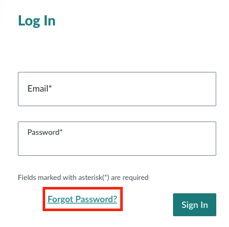
- You’ll be taken to your organization’s Foundry login page.
- Learners using SSO will authenticate through their SSO provider.
- Learners not using SSO will be prompted to create a password the first time they log in.
After logging in, learners are taken directly to their Learner Dashboard.
Using the Learner Dashboard
The dashboard shows all assigned courses:
-
Open Courses
Display a progress bar and the time remaining to complete them. -
New Courses
Show a Start button. Click to launch the course for the first time. -
In‑Progress Courses
Show a Continue button. Click to jump back in without losing prior progress.
Password & Login Troubleshooting
Foundry temporarily locks accounts after 5 failed login attempts. If this happens, the learner must wait 10 minutes before trying again. If a learner forgets their password, they can request a reset by selecting Forgot Password? on the login page.