
As a primary administrator, you can add multiple users to Foundry at the same time by uploading a user list. This process uses a standard template to ensure user profile information is formatted correctly before import.
You must add Locations to your account before adding users.
Upload users using a template
1. Go to Users > Manage Users.
2. In the top-right corner, select Add New Users, then choose Upload New Users.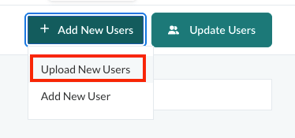
3. If your organization has more than one learner population, select the population you want to upload first.
Prepare the user list
Before uploading users, you must complete the user list template.
Download the template
Download the template file and use it to enter user information.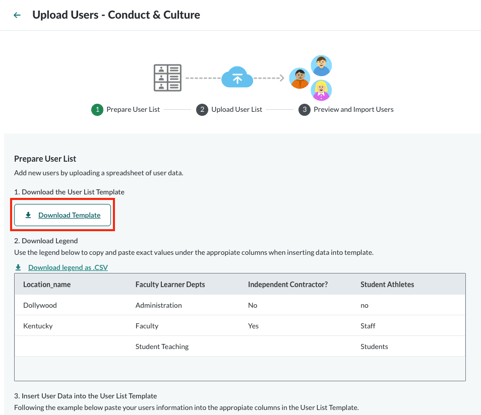
- Do not change or remove the column headers, even if you do not plan to use a column.
Changing headers will cause an upload error.
Download the legend (.CSV)
The legend contains all existing learner classifications.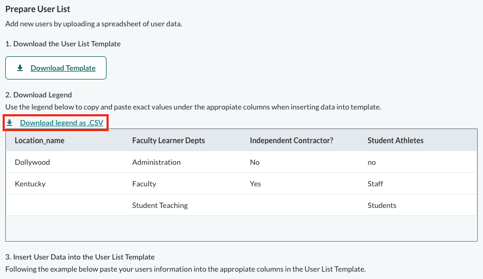
- You can copy and paste values from the legend into the template.
- Locations, categories, and labels must match Foundry exactly and are case sensitive.
Any mismatch will result in an upload error.
Insert user data into the template
Enter user information into the template using the provided example as a guide.
- For detailed instructions, see User List Template Guidance.
- Save the completed file as a .CSV.
Upload and confirm
4. Select Next to upload the file to Foundry. Click the Choose a File button to select the file you'd like to upload.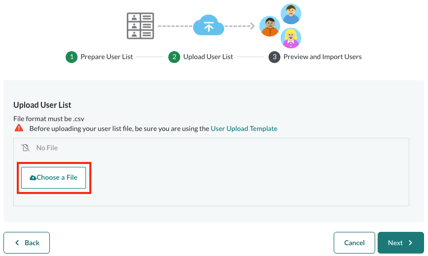
5. Select Next again to review and confirm the upload.
6. Go to Users > User Upload to view the history and status of past uploads.
Please Note: The template will only pre-populate with the correct category names if the category exists in the platform.
You must first add your categories/labels to Foundry before you download the template. If you add new categories, you must download a new template.