
All course configurations are completed in Foundry on a per‑course basis. You will configure each course and create and download your SCORM package by navigating to the left navigation menu and selecting Content.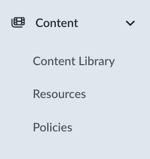
From the Content area, you can manage all available configuration options for the course. This includes adding your organization’s custom policies, custom resources, and any other configuration options the course allows.
Creating assignments and launching courses is handled through your LMS or HRIS, which is where learners access their training. Progress and completion data should primarily be managed within your LMS or HRIS; however, this data is also recorded in Foundry as a backup.