
Your organization can customize the Foundry login page to better reflect your brand. These updates help create a consistent and familiar experience for learners when they sign in to ComplyEQ.
Below are the customization options available for your custom login page.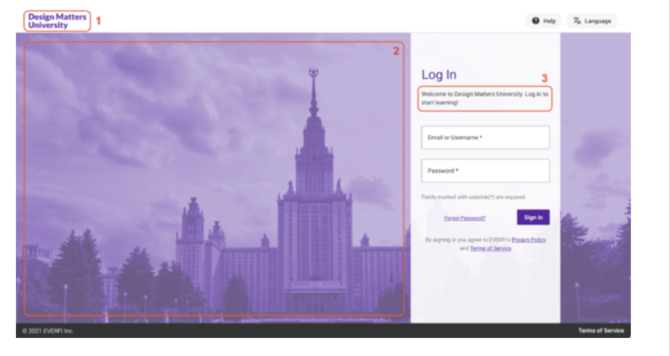
Company logo
You can add your company logo to the login page.
- The logo appears in the top-left corner of the page
- The image automatically scales to 40 pixels in height
- Preferred file formats are JPG, PNG, or GIF
For best results, use a clear logo with good contrast against the background.
Background image
You can add a background image to appear behind the login screen.
- The image displays as the full-page background
- The file width must be between 480 px and 3000 px
- Images closer to 3000 px wide typically look best
- Preferred file formats are JPG, PNG, or GIF
Choose an image that supports readability and does not distract from the login fields.
Welcome text
You can include short welcome text on the login page.
- The text appears on your organization’s login screen
- Limit the content to one or two sentences
- Text formatting, including line breaks, is not supported
Use this space to greet learners or provide brief context about the training.
Brand colors
You can customize the learning platform to match your brand colors.
- Provide one dark color and one light color
- These colors are applied throughout the ComplyEQ experience
Using brand colors helps create a consistent look across the platform.
If you’re ready to update your custom login page, gather your images, text, and brand colors before submitting your request. This helps ensure a smooth setup process.