
ComplyEQ provides flexible privacy options so your organization can meet regulatory requirements and support learner choice. You can display your own privacy policy across the platform and manage privacy preferences at the individual learner level.
This article explains the available options and how they work.
Use your own privacy policy
Your organization can display its own privacy policy throughout the ComplyEQ platform.
-
You provide a custom Privacy Policy URL
-
A ComplyEQ Support team member adds the URL for you
-
The policy appears on:
-
The login page
-
The footer of each course
-
To get started, share your Privacy Policy URL with Support so it can be added to your organization.
Manage learner privacy opt‑out settings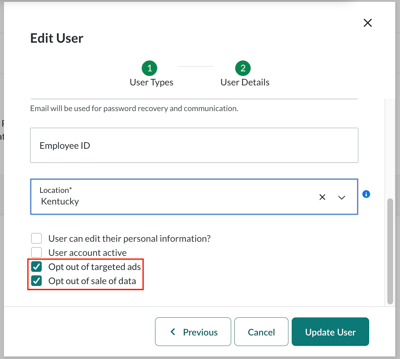 You can manage privacy preferences for individual learners when creating or editing a user record.
These settings appear as checkboxes on the learner’s profile in the admin experience.
To update these settings, navigate to the learner’s record and check or uncheck the appropriate boxes.
Opt out of sale of data
This setting allows a learner to opt out of the sale of their data.
- Sale of data refers to user data sold in aggregate to third‑party companies
Opt out of targeted ads
This setting allows a learner to opt out of targeted advertising.
- Targeted ads are advertisements shown to a user based on their internet activity and profile
Important notes about opt‑out settings
- These opt‑in and opt‑out options exist for regulatory compliance
- The intent is to allow learners to control whether they receive marketing‑related emails from your organization
- Opting in or out does not mean learner data is being sold
As outlined in the ComplyEQ Privacy Policy, ComplyEQ does not sell user data to third parties.
Required setup steps
If you plan to manage learner opt‑out settings, make sure you complete both steps below:
- Decide which opt‑out settings your organization will use
- Contact Support with your Privacy Policy URL so it can be added to your organization
Completing these steps ensures privacy settings are applied correctly across the platform.