
You can deactivate an existing policy so learners no longer see it in their courses. Deactivated policies are not deleted. Foundry continues to store the policy and keeps a record of all learners who acknowledged it.
You can deactivate a policy in one of two ways:
- From the Course Customizations page
- From the My Policies page
Deactivate a policy from the Course Customizations page
Use this option when you want to remove a policy from a specific course.
- Go to Content > Content Library
- Search for the course that includes the policy
- Select Configure on the course card

- Locate the module that contains the policy
- Look for a “This module supports policy” label next to the module title

- Look for a “This module supports policy” label next to the module title
- Expand the module and scroll to the policy you want to remove
- Select Deactivate
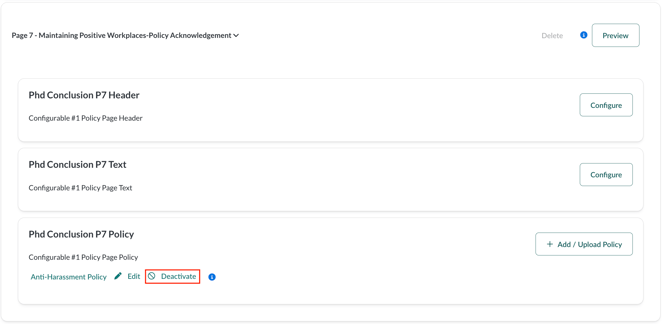
- Select OK to confirm
The policy is immediately removed from the course.
Deactivate a policy from the My Policies page
Use this option when you want to deactivate a policy across all courses where it is used.
- Go to Content > Policies
- Locate the policy in the policy table
- In the Actions column, select the ban icon
 to deactivate the policy
 - Review the confirmation message, which lists all courses using the policy
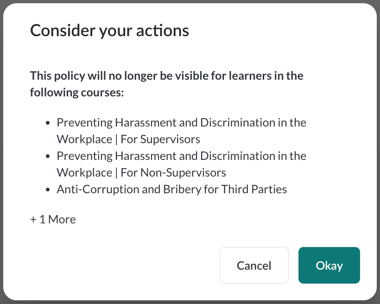
- Select Okay to confirm
Once deactivated, the policy no longer appears to learners in any course.
What happens after deactivation
- Learners will no longer see the policy
- The policy file or URL is not deleted
- Foundry retains the policy and the full list of learners who acknowledged it
This allows you to maintain historical records while keeping current courses up to date.