
There may be times when you need to deactivate multiple users at once, such as during employee offboarding or organizational changes. Foundry allows you to deactivate users in bulk while keeping their historical data for reporting and record‑keeping purposes.
You can deactivate multiple users in two ways:
- From the Manage Users page
- By using a Quick List
Deactivate users from the Manage Users page
This option works best when you want to deactivate:
- Users with a shared label, location, or other filter, or
- A small number of users you can manually select
Steps
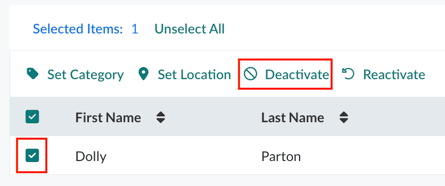
- Go to Users > Manage Users
- Select the users you want to deactivate by:
- Checking the boxes next to individual user names, or
- Using the filters at the top of the page to narrow the list
- Select Deactivate, located above the table header
- Confirm the action
The selected users are immediately deactivated.
Deactivate users using a Quick List
Quick Lists are recommended when you need to deactivate a specific group of users who span multiple categories, labels, or locations.
Quick Lists allow you to upload and reuse a defined set of users for assignments, reporting, and user management.
Steps
- Create a Quick List that includes the users you want to deactivate
- Go to Users > Manage Users
- Select See All Filters above the users table
- Expand the Quick List section
- Select the Quick List you created, then select Apply Filters
- Select the checkbox in the table header to select all filtered users
- Select Deactivate to deactivate all users in the list
All users included in the Quick List are deactivated at once.
What happens after deactivation
- Deactivated users do not appear in the Manage Users list when filters are set to Only Active Users
- Deactivated users can be found by filtering for Deactivated users
- Users can be reactivated at any time by selecting Reactivate
- Deactivating users does not delete data from the Reporting section
This ensures your user records remain accurate without losing historical data.