
As an administrator, you may need to add a single user or update an existing user in your Foundry account. This is most commonly used when adding an administrator, but it can also be used for learners.
Use this method when:
- Adding one user at a time
- Updating User Details, Location, Custom Categories, Custom Labels, or Role for a small number of users
If you need to add several users at once, see Add Multiple Users.
Add a Single User
Step 1: Navigate to Manage Users
1. Go to Users > Manage Users
2. In the top‑right corner, click Add New Users
3. Select Add New User
Step 2: Enter the User’s Email Address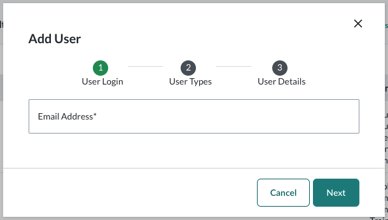
4. Enter the user’s Email Address
5. Click Next
Step 3: Select User Type and Role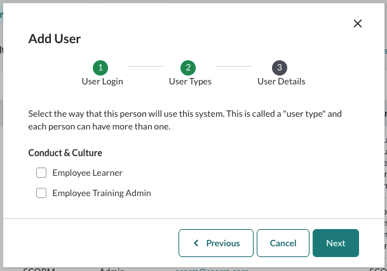
6. Select the appropriate User Type(s)
7. Click Next
This opens a multi‑select menu. Available options vary based on your own permissions and role.
Common options include:
-
Employee Learner – Can be assigned courses
-
Supervisor – Supervises other employees
-
Non‑Supervisor – Does not supervise others
-
Employee Training Admin – Can add and edit users, manage course resources, and create assignments
Step 4: Complete User Details
8. Enter the available profile information. Fields may vary based on your organization’s settings.
Key fields include:
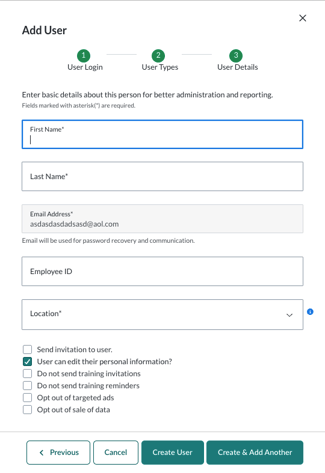
- First & Last Name
-
Employee ID / Student ID (optional, for internal tracking)
-
Location (appears only if multiple locations are configured)
-
SSO ID (appears only if single sign‑on is enabled)
Additional options:
-
Send Invitation to User
-
Recommended for administrators
-
Typically unchecked for learners, who are notified when assignments start
-
-
User Can Edit Their Personal Information
-
Recommended for administrators only
-
-
Do Not Send Training Invitations / Reminders
-
Use only if you do not want this user to receive automated messages
-
Recommended to leave unchecked for learners
-
Step 5: Save the User
9. Click Create User to complete the profile
User Profile fields may differ based on your organization’s configuration. For example, accounts with a single location will not see a location dropdown.
If your organization uses Alternative Login, see Alternative Login: Add a Single User.
Edit a Single User
Use this approach when updating details for a small number of existing users.
Steps
- Go to Users > Manage Users
- Search for the user and click their name to open the User Profile
- Click Edit User, make your updates, and select Update User
From Edit User, administrators can update:
- User types, roles, and capabilities
- User details such as name, email, location, ID, and SSO ID
To update labels:
- Select More Actions > Manage Labels to add, remove, or change Custom Labels used for classification
- Review changes and click Save
Add an Additional Administrator
- Go to Users > Manage Users
- Click Add New Users and select Add New User
- Select the appropriate Admin User Type(s)
This is a multi‑select menu and may vary by population, such as Employees, Faculty/Staff, or Students
A user can be both an administrator and a learner - Click Next and complete the User Details form
- Check Send Invitation to User if you want the admin to receive login instructions
- Click Create User to save the profile
Note: Administrators will only be able to add/remove user types and roles associated with their own permissions. The organization must have a category/label created prior to making any edits to the user’s profile.