
If you need to edit information tied to an existing location, for instance updating an address or adding a point-of-contact, you can do so by following the steps below.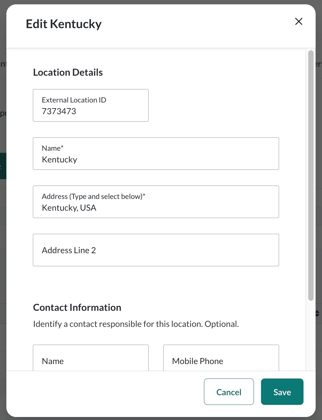
- Go to Users > Locations
- In the table, find the location you want to edit and click the pencil icon (“Edit Location”) in the Actions column on the far right.
- The Edit Location form will open. Make your edits as needed.
- External Location ID (optional) = An internal reference to the Location. Learners do not see this.
- Name = This is something users will see so choose something that is recognizable. Common names reference the state or town/city
- Address = It can be as specific as a street address or just the state. At minimum, the state is required so courses can reference the applicable state laws.
- Contact Information = If there is a specific administrator who is the main point of contact at a specific location, then this is where that information can be stored. It is not required.
- Click Save