
Assignments in Foundry move through defined statuses that control what administrators can change, how learners experience assignments, and how progress appears in reports.
This guide explains:
- Assignment statuses for Quick Assignments and Automated Assignments
- What each status allows administrators to do
- How learners see assignments at each stage
This guide applies to workforce and employee training in Foundry.
On this page
Quick Assignment lifecycle
Quick Assignments follow this lifecycle:
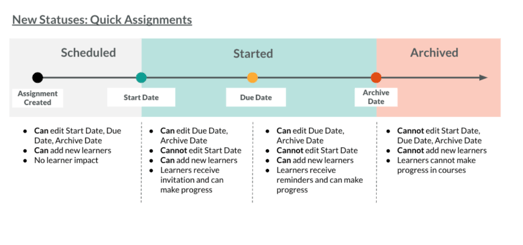
Quick Assignment statuses
| Status | Scheduled | Started | Archived |
|---|---|---|---|
| When this status is used | Assignment is set up ahead of the start date | Assignment has started and invitations have been sent | Assignment is fully ended |
| Can I edit the assignment? | Yes, before the start date | Due Date, Archive Date, and Reminders only | No |
| Can I manually add learners? | Yes | Yes | No |
| Invitations | No invitations sent | Invitations sent on the start date; learners added later receive an invite when assigned | No invitations |
| Reminders | No reminders | Sent according to schedule | No reminders |
| Learner dashboard | Not visible | Visible on the Open tab until completed | Incomplete assignments appear on the Closed tab and cannot be opened; completed assignments allow Review Content |
| Training Progress Report | Progress appears once learners are assigned | Active progress is tracked | Progress remains visible but the assignment is closed |
| Can I unassign learners? | Yes | Yes | Yes, if not completed |
| Can learners be assigned this content again? | Yes, depending on Training Period rules | Yes, depending on Training Period rules | Yes, depending on Training Period rules |
| Can I archive the assignment? | Yes | Yes | No (already archived) |
Training Period behavior (Quick Assignments)
- If a learner is assigned the same content within the same Training Period, they see one course instance with a single progress record
- If assigned in a different Training Period, they see separate course instances with separate progress records
Automated Assignment lifecycle
Automated Assignments follow this lifecycle:
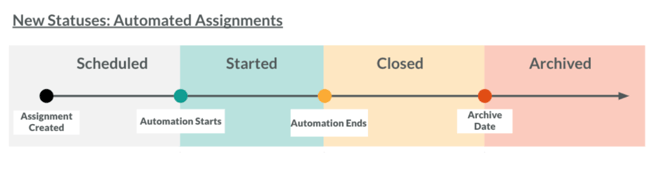
Automated Assignment statuses
| Status | Scheduled | Started | Closed | Archived |
|---|---|---|---|---|
| When this status is used | Assignment is configured before automation begins | Automation is running and adding learners | Automation has stopped; no new learners added | Assignment is fully ended |
| Can I edit the assignment? | Yes, before the start date | Due Duration, Archive Date, and Reminders only | Archive Date only | No |
| Can I manually add learners? | No — learners must meet selection criteria | No — learners must meet selection criteria | No — learners must meet selection criteria | No |
| Invitations | No invitations | Invitations sent when learners are added | No new invitations | No invitations |
| Reminders | No reminders | Sent according to schedule | Sent according to schedule | No reminders |
| Learner dashboard | Not visible | Visible on the Open tab until completed | Visible on the Open tab until completed | Incomplete assignments appear on the Closed tab and cannot be opened; completed assignments allow Review Content |
| Training Progress Report | Learners appear once they are assigned | Not Started, In Progress, Complete, or Past Due | Not Started, In Progress, Complete, or Past Due | Closed |
| Can I unassign learners? | Yes | Yes | Yes | Yes, if not completed |
| Can learners be assigned this content again? | Yes, depending on Training Period rules | Yes, depending on Training Period rules | Yes, depending on Training Period rules | Yes, depending on Training Period rules |
| Can I stop automation (close)? | Yes | Yes | No (already closed) | No |
| Can I archive the assignment? | Yes | Yes | Yes | No (already archived) |