
Your Foundry login page is specific to your organization, so the URL may be different from other learners’.
The easiest way to find the correct login page is through your course invitation email.
Log back in using your invitation email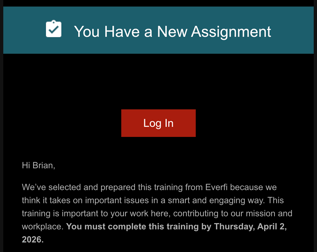
- Open the invitation email you received for your course
- Select the link in the email to go to your organization’s login page or click the Log In button
- Log in using the email address and password you registered with
If you can’t find your invitation email, be sure to check your Spam or Junk folder.
If you still can’t find the email
If you’re unable to locate your invitation email, contact your teacher, supervisor, or organization contact and ask them to send you a password reset email. The reset email will take you to the correct login page and allow you to access your course.
Tip for future access
For easy access later, consider bookmarking your organization’s login page in your web browser.
Still need help logging in? Reach out to our Support Team. Be ready to tell them your name, email, and the name of the organization you are working for/with.