
Administrative access in Foundry is controlled through user type and role. The steps differ slightly depending on whether the user already exists in your account.
If the user does not already exist
Use these steps to add a new user and grant administrative access at the same time.
- Log in to Foundry
- Go to Users > Manage Users
- Select Add New User in the top‑right corner
- From the dropdown, select Add New User
- Select the appropriate admin user type (typically the option that ends in admin)
- Select Next and complete the user profile
- Select Send Invite to User (recommended)
The user will receive an email invitation to set up their account.
If the user already exists
Use these steps to update an existing user’s access.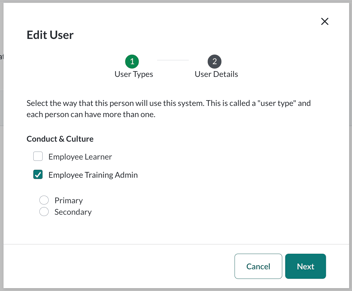
- Log in to Foundry
- Go to Users > Manage Users
- Use the search bar to locate the user
- Select the user’s name to open their profile
- Select Edit, then Edit User
- On the edit screen, select the appropriate admin role
- Select Next to save your changes
Administrative access is applied immediately.
Important notes
- Only users with sufficient permissions can grant administrative access
- Admin roles and visibility depend on your organization’s configuration
- If you’re unsure which admin role to assign, consult your Primary Administrator or Customer Success team