
Overview
This article explains how to keep learner data in Foundry synchronized with your system of record using the Foundry API. It is written for technologists and developers who support integrations, but anyone familiar with basic data synchronization concepts should be able to follow along.
The goal of an API-based sync is to ensure that learner records in Foundry accurately reflect your organization’s source system. Learner data flows in one direction, from your system of record into Foundry. Changes made in Foundry do not flow back.
All learners must exist as users in Foundry in order to track progress, assign learning activities, and manage access.
An API integration allows you to:
- Add learners automatically
- Keep learner profile data up to date
- Deactivate learners who leave your organization
Key Concepts and Terminology
Foundry
ComplyEQ’s digital learning platform.
System of record
The source system that owns learner data. This may be an HRIS, CRM, student information system, or another internal database.
Learner
A person who participates in Foundry learning activities.
Foundry user
A user record in Foundry that includes identifying information, status, and role assignments. Each user has a unique Foundry User ID.
Integration platform
The tool or application that connects your system of record to Foundry.
User Sync Scenarios
The way you sync learners depends on what your system of record can support.
At a minimum, your system should be able to:
- Identify which learners exist
- Indicate whether a learner is active or inactive
More advanced systems may also:
- Track which learners changed since the last sync
- Store the Foundry User ID for each learner
Based on these capabilities, there are two common sync approaches.
Simple User Sync Scenario
Use this approach when:
- Your system of record can identify which learners changed
- Your system stores the Foundry User ID for each learner
In this model, each sync run processes only new or changed learners.
Typical flow
- New learners are added using a POST request
- Existing learners are updated using a PATCH request with the Foundry User ID
- Learners who leave the organization are deactivated using a PATCH request with
active=false
When a user is created, the API returns the Foundry User ID. Store this value so future updates can target the correct user.
Because your system already knows which users exist in Foundry, there is no need to retrieve users from Foundry during the sync.
Example: Creating a new learner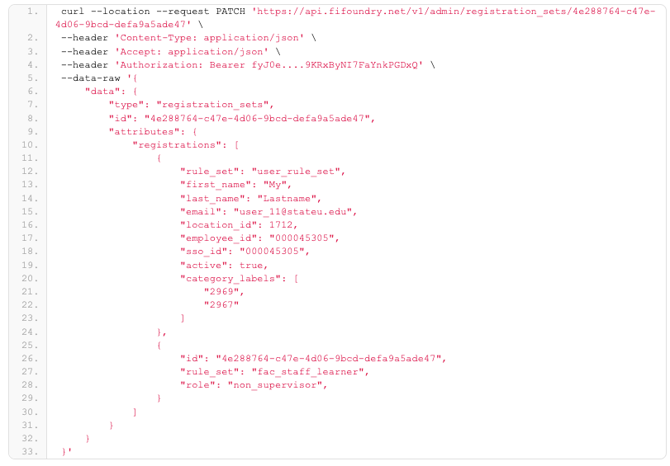
Example: Updating an existing learner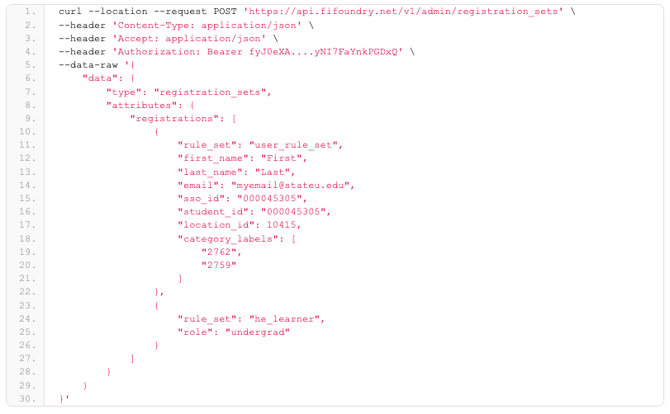
Complex User Sync Scenario
Use this approach when:
- You cannot reliably track which learners changed
- You do not store Foundry User IDs in your system of record
In this model, each sync run performs a full reconciliation between systems.
Retrieving Data for Reconciliation
Start by gathering two complete lists.
From your system of record:
- All learners who should exist
- Their active or inactive status
From Foundry:
- All existing users, retrieved using paged GET requests
- Each request returns up to 100 users
- Continue requesting pages until no results remain
Store the Foundry users in a searchable structure supported by your integration platform.
Example: Retrieving users from Foundry with pagination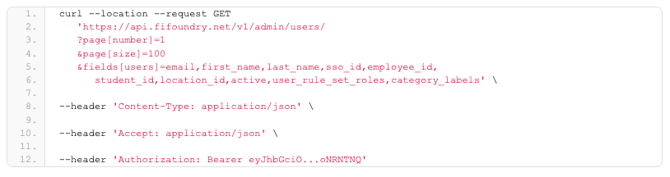
At this point, you have two datasets:
- Learners from the system of record
- Users from Foundry
Matching and Reconciling Users
For each learner from the system of record, attempt to find a matching Foundry user.
Recommended matching identifiers
- Employee ID
- Student ID
- SSO ID
Email address may be used but is not recommended, as it can change.
Reconciliation rules
For each learner:
- If a matching user exists and data differs, send a PATCH request
- If a matching user exists and data is identical, take no action
- If no matching user exists, send a POST request to create the user
- If the learner is inactive, send a PATCH request with
active=false
You may also choose to review or deactivate Foundry users that do not exist in your system of record.
Example: Updating a user during reconciliation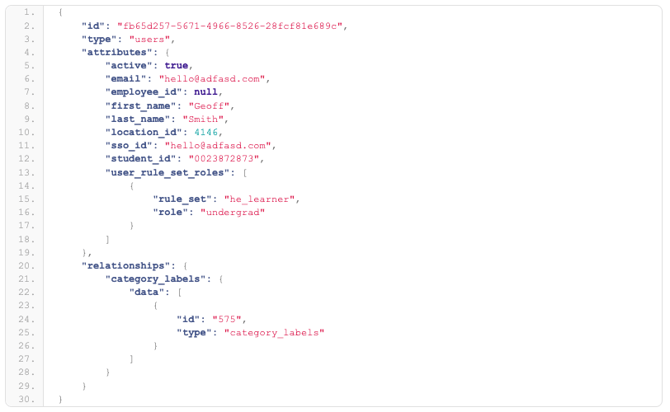
Example Reconciliation Walkthrough
In this example, SSO ID is used as the matching key.
System of record learners
| SSO ID | First | Last | Active |
|---|---|---|---|
| 33 | Geoff | Smith‑Evans | T |
| 44 | Kate | Jones | T |
| 55 | Leo | Later | F |
| 686 | Ellen | Cohen | T |
| 77 | Mike | Morris | F |
Foundry users
| Foundry ID | SSO ID | First | Last | Active |
|---|---|---|---|---|
| dek‑123 | 33 | Geoff | Smith | T |
| zak‑928 | 44 | Kate | Jones | T |
| iux‑332 | 55 | Leo | Later | T |
| qai‑928 | 787 | Dan | Dismayed | T |
Actions taken
- Update SSO ID 33 due to a last name change
- Take no action for SSO ID 44
- Deactivate SSO ID 55
- Add SSO ID 686
- Take no action for SSO ID 77
- Review or deactivate SSO ID 787
This example demonstrates how a full reconciliation resolves differences between systems.
First‑Time API Sync Considerations
If users already exist in Foundry before the API integration is enabled, the first sync may create duplicate users.
To reduce this risk:
- Perform an initial reconciliation using stable identifiers
- Consider bulk‑adding users to Foundry before enabling automation
After the initial run, ongoing syncs typically process only changes.
Additional Considerations
Sync frequency
Most organizations sync daily, but frequency can vary.
Rate limits
Limit requests to 200 per rolling 60 seconds. Handle 429 responses by pausing and retrying.
Reactivating learners
Include inactive users in GET requests so they can be reactivated when needed.
Administrators
Some Foundry users may be both learners and administrators. Account for user type differences.
Summary
Syncing learners with the Foundry API allows you to maintain accurate, up‑to‑date user records automatically. By choosing a sync approach that aligns with your system’s capabilities, you can reliably add, update, and deactivate learners at scale while minimizing manual effort.