
Overview
Teams provide an additional layer of permission control in Foundry. Teams limit which learners and data an administrator can view and manage.
Administrators assigned to a Team can only see learners and related data within that Team. Primary Administrators are the only users who can create and edit Teams.
Permission Levels
A user’s role determines what features and data they can access in Foundry. When Teams are enabled, a Team filter appears in Manage Users and Reports, making it easier to view learner data by Team.
Primary Administrators
- Can access all features and data across all Teams
Secondary Administrators (Team Leads) Team Leads can access the following only for the Teams they manage:
-
Manage Users
Team Leads may see users outside their Teams but cannot edit them -
Reports
Team Leads can view all report types, but report data is limited to learners within their Teams -
Assignments
Team Leads can only see and manage assignments they create for their Teams
Important If a Primary Administrator creates an assignment that is not associated with a Team, Team Leads will not be able to see that assignment, even if the learners belong to their Team.
| Feature / Area | Primary Administrator | Secondary Administrator (Team Lead) |
|---|---|---|
| Create and edit Teams | Yes | No |
| View all Teams | Yes | No, only Teams they manage |
| Manage Users | Yes, across all Teams | View all users, edit only users within their Teams |
| View learner data | All learners | Learners within their Teams only |
| Reports access | All reports, all learners | All report types, Team‑scoped learner data only |
| Create assignments | Yes, for any Team or organization‑wide | Yes, but only for Teams they manage |
| View assignments | All assignments | Only assignments they create |
| Edit assignments | All assignments | Only assignments they create |
| View non‑Team assignments | Yes | No |
| Assign content via Teams | Yes | Yes, for their Teams only |
Create a Team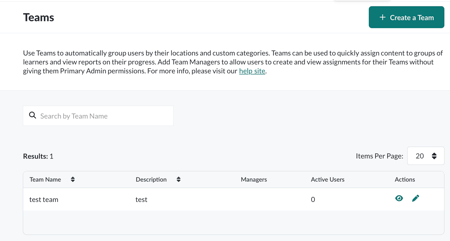
To create a Team:
- Go to Users > Teams
- Select Create New Team
- Complete the form fields
Required and optional fields
- Team Name*
- Description
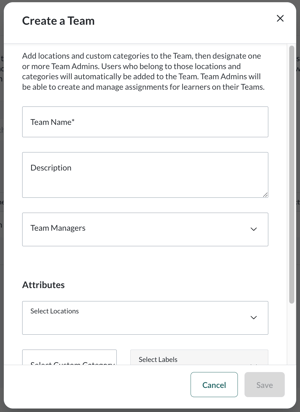
- Team Manager(s)
- Phone Number
- Image URL
- Website
- Attributes*
Attributes determine which users are automatically added to the Team. You can use only one of the following options:
-
Location(s)
Users must have one of the selected Locations to be added to the Team -
Custom Category + Label(s)
Users must have at least one of the selected Labels within the chosen Custom Category
View and Edit Teams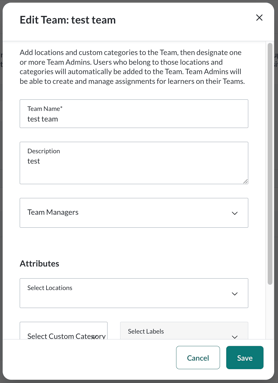
From the Manage Teams page, you can:
- View Team names and descriptions
- See assigned Team Managers
- Review active user counts
- Open a Team to edit details
In the Edit Team view, you can:
- Update Team information
- View the full list of users in the Team
User Management
Teams rely on Attributes such as Locations, Categories, and Labels to determine membership.
Primary Administrators can:
- Add new users
- Edit existing users
- Update user attributes so learners are automatically placed into the correct Team
Assignment Management
When creating an assignment, you can optionally select a Team to define which learners receive it.
-
Primary Administrators
Can create assignments for specific Teams or across the entire organization -
Secondary Administrators (Team Leads)
Must select a Team they manage and can only create assignments within those Teams
Important If you change the Team associated with an assignment, learners who were already assigned will retain access, and learners in the newly selected Team will also be included.
For Team Leads
If you are a Team Lead, see Foundry for Team Leads to learn how to manage learners, assignments, and reporting for your Team.